How to Manage Authors and Aliases
Author Roster: Managing Authors and Aliases
Your Author Roster is the foundation of Imprint Core. Keeping these records accurate ensures that your royalty splits calculate correctly, statements generate in the right currency, and automated payments process smoothly. ⚡ How Imprint Automates Data: > When you import a royalty file from any supported vendor, Imprint automatically checks your roster. If an author doesn’t exist, a new record is created and linked to their titles. The system even looks for common formatting flips (e.g., Wolfram Hart vs. Hart, Wolfram) and automatically links them as aliases!

Clicking on Author Roster in the left-hand sidebar opens the Author Registry. This is your master dashboard for viewing all current contributors, their contact details, legal names, default royalty percentages, base currencies, and linked works.
Adding a New Author

To manually add a new author before your first import:
Click the Add New Author button.
Enter the author's name in the dialogue box and click OK.
Note: Imprint will display a warning at the top of the screen stating there is an author with no linked editions. You can safely ignore this until you assign them to a title or import their sales data!

Setting up Author Metadata.

The Goal: Configure the author's financial profile so they are paid correctly.
Double-click on any author record (or highlight them and click Edit Selected) to open the Metadata screen. Here you can define their Legal Name, Active Status, and Default Royalty Rate (which can always be customized on a title-by-title basis later).
Pro-Tip: The Two Critical Fields To get the most out of Imprint Core's automation, ensure these two fields are always filled out:
Base Currency: This guarantees their PDF royalty statements are automatically converted and generated in their correct local currency.
Email Address: This is required if you want to use the one-click SMTP engine to email their statements. Crucially, this is also the email address used by the PayPal Mass Payment export. Ensure the email you enter here is the one linked to their PayPal account!
Managing Author Aliases
The Goal: Ensure sales under different pen names—or from vendors with weird formatting—all flow to the correct human being.
Vendors often report data differently (for example, IngramSpark formats author names differently than KDP or ACX). Furthermore, you may have authors writing under multiple pen names who just want a single, consolidated royalty statement at the end of the month.
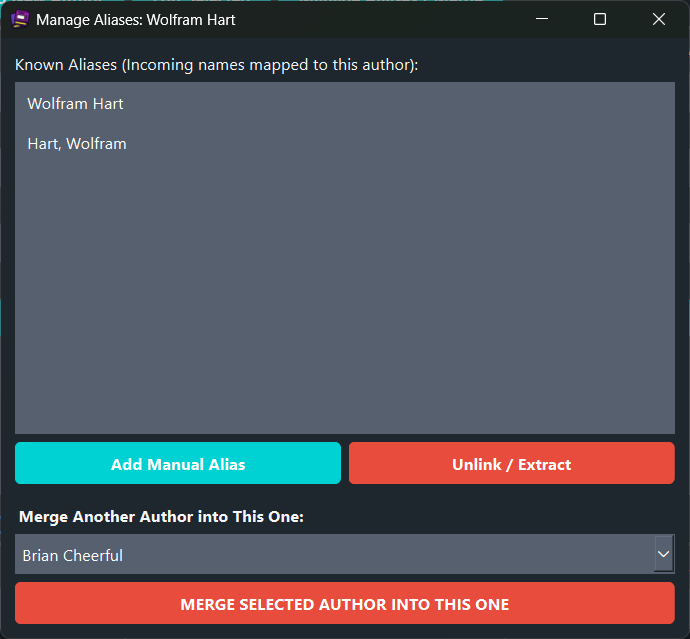
How to manage aliases:
Add a Manual Alias: Click the Add Manual Alias button, type in the pen name or vendor spelling, and click OK. Any future sales under this name will automatically route to this master author record.
Merge Existing Authors: If you accidentally ended up with two separate records for the same person (or want to combine multiple pen names into one consolidated royalty statement), select the duplicate author from the dropdown list and click Merge Selected Author into This One.
Unlink a Mistake: If an alias was linked incorrectly, simply highlight the incorrect name under the Known Aliases list and click the Unlink / Extract button to separate them back into their own record.


Comments